ROS2 Integration
Where This Fits
This page shows how Atlas timing appears inside ROS2 systems.
Atlas does not replace ROS2.
It provides a deterministic time foundation beneath it.
The Problem: ROS2 Assumes Time Is Already Correct
ROS2 is a powerful middleware.
But it assumes:
sensor timestamps are already correct
In real systems, they are not.
Sensors operate on independent timing sources:
- USB cameras introduce jitter
- LiDAR runs on internal clocks
- IMU and GNSS drift independently
This leads to:
- inconsistent timestamps
- sensor misalignment
- degraded fusion and SLAM
- difficult debugging
ROS2 does not solve this.
What Atlas + DSIL Changes
Atlas introduces a hardware-backed time authority.
DSIL maps all sensor data into that time.
Instead of fixing time inside each driver:
- Atlas defines system time
- DSIL aligns all data
- ROS2 receives consistent timestamps
No driver rewrites required.
What Stays the Same
You keep your existing ROS2 stack:
- camera drivers
- LiDAR drivers
- IMU drivers
- GNSS drivers
- serial nodes
No custom ecosystem required.
What Changes
The meaning of time becomes deterministic and observable.
Instead of trusting raw timestamps:
- time is normalized to Atlas time
- offsets become visible
- drift becomes measurable
- synchronization becomes observable
ROS2 now receives:
- corrected timestamps
- time offset per sensor
- drift trend
- synchronization state
- timing confidence
Time Becomes Visible in ROS2. This is where Atlas changes everything.
Instead of guessing timing issues, you can see them directly:
/atlas/time_offset/front_camera: -1.1 ms
/atlas/time_offset/lidar: 3.2 ms
/atlas/time_offset/imu: -0.4 ms
And not just offset — behavior over time:
sensor: lidar_top
tier: 2
offset_ms: 3.2
drift_ms_per_sec: 0.02
confidence: high
sync_state: locked
This is the difference:
| Without Atlas | With Atlas |
|---|---|
| “Fusion seems unstable” | Offset = +3.2 ms |
| “Maybe sensor drift?” | Drift = 0.02 ms/sec |
| “Hard to debug” | Sync state = locked |
Atlas turns invisible timing problems into observable data.
The 3 Timing Tiers in ROS2
Not all sensors have the same time quality.
DSIL exposes this explicitly.
Tier 1 — Authority Time
Sensors tied to hardware timing (PPS / trigger / sync).
ROS2 receives:
- timestamps anchored to hardware events
- minimal drift
- highest confidence
Result:
- strongest fusion accuracy
- deterministic replay
Tier 2 — Derived Time
Sensors with observable timing behavior.
DSIL builds a correlation model.
ROS2 receives:
- corrected timestamps
- tracked drift
- stable alignment
Result:
- practical synchronization without firmware changes
Tier 3 — Transport Time
Sensors where only arrival time is visible.
DSIL estimates timing behavior.
ROS2 receives:
- corrected timestamps
- offset + drift visibility
- lower confidence
Result:
- usable timing instead of blind arrival timestamps
Timing Drift (Critical)
DSIL continuously tracks:
- offset (current difference)
- drift (rate of change)
This enables:
- detection of unstable sensors
- real-time timing validation
- better debugging
Mechanics of Synchronization
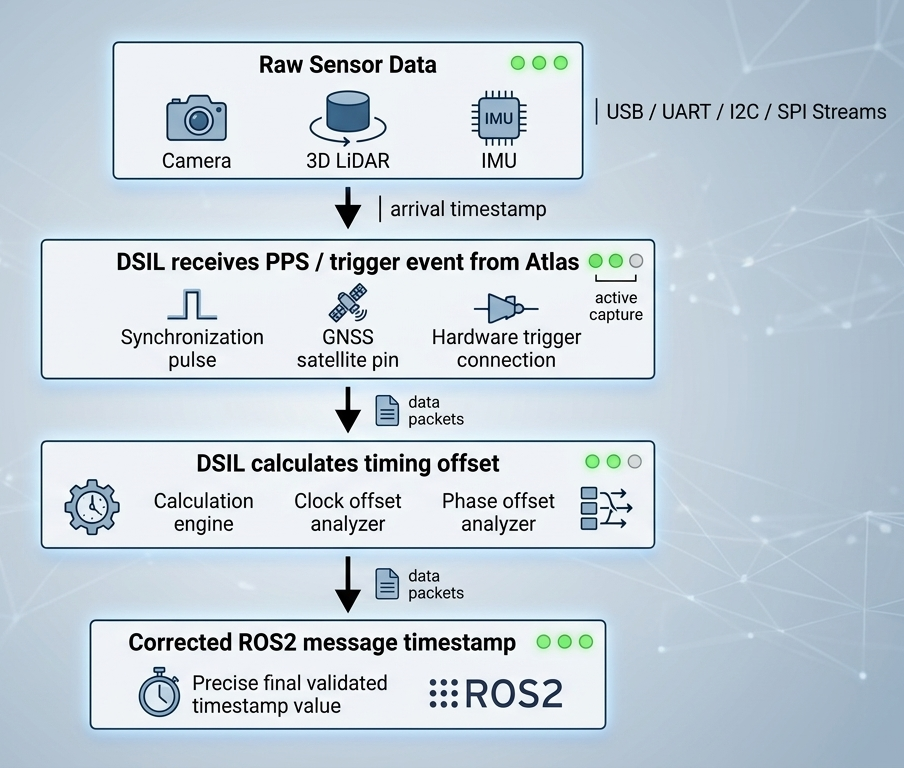
DSIL performs timestamp correction using hardware timing events captured by Atlas.
Core mapping:
raw sensor arrival time → Atlas hardware timing event
DSIL applies a dynamic offset to ROS2 message headers.
Important:
- sensor firmware is NOT modified
- sensor clocks are NOT changed
Compatible with:
- UVC cameras
- serial sensors
- LiDAR drivers
- standard ROS2 drivers
ROS2 Topics
Standard Sensor Topics (Unchanged)
/camera/image_raw/imu/data/gps/fix/lidar/points
Atlas Observability Topics
/atlas/time/status/atlas/time/source/atlas/time_offset/<sensor>/atlas/sync/events/atlas/health
Recommended Timing Metadata
Each sensor can expose:
- sensor name
- time source tier
- raw timestamp
- corrected timestamp
- current offset
- drift trend
- confidence
- sync state
Example:
sensor: lidar_top
tier: 2
offset_ms: 3.2
drift_ms_per_sec: 0.02
confidence: high
sync_state: locked
ROS2 Topic Mapping
| Atlas Data | ROS2 Topic | Message Type |
|---|---|---|
| IMU telemetry | /imu/data | sensor_msgs/Imu |
| GNSS position | /gps/fix | sensor_msgs/NavSatFix |
| PPS timing events | /atlas/pps | std_msgs/Bool |
| Synchronization pulse | /atlas/sync | std_msgs/Bool |
| System health | /atlas/health | diagnostic_msgs/DiagnosticStatus |
Atlas integrates directly into:
- SLAM
- sensor fusion
- navigation
- diagnostics
Quick Start
Launch DSIL:
ros2 launch atlas_dsil_bridge telemetry.launch.py
List topics:
ros2 topic list
Inspect timing:
ros2 topic echo /atlas/time_offset/lidar
Power Health Observability
Atlas extends system observability beyond timing.
In addition to /atlas/time_offset/*, Atlas exposes:
/atlas/power_health
This provides direct visibility into system power behavior inside ROS2.
Example Message
vin_voltage: 24.1
v5_sys: 5.02
v5_usb: 5.01
v3v3: 3.30

vin_fault: false
v5_sys_fault: false

usb_ports:
  port1_enabled: true
  port1_fault: false
  port2_enabled: true
  port2_fault: false
  port3_enabled: true
  port3_fault: false
Why This Matters
In most robotics systems:
- power debugging requires on-site measurement
- failures are difficult to reproduce
- no software-level visibility exists
More importantly:
power instability is often the root cause of timing instability
But traditional systems cannot prove this.
What Atlas Enables
Remote Debugging
- inspect voltage and faults remotely
- diagnose field issues without physical access
Faster Bring-Up
- no multimeter required
- voltage and fault data already available in ROS2
Cross-SKU Consistency
- same
/atlas/power_healthinterface across all systems - reusable debugging workflows
- no per-SKU custom instrumentation
Timing + Power Together
Atlas exposes both dimensions:
/atlas/time_offset/*→ timing truth/atlas/power_health→ power truth
This allows engineers to directly correlate:
timing instability ↔ power instability
Summary
Power is no longer invisible hardware behavior.
It becomes:
observable, structured ROS2 data — aligned with time authority
Runtime Characteristics
Atlas operates as a deterministic infrastructure layer with minimal overhead.
Message Frequency and Latency
| Topic | Typical Rate | Notes |
|---|---|---|
/atlas/pps | 1 Hz | PPS timing event |
/atlas/sync | Event-driven | Sync trigger |
/imu/data | 100–400 Hz | Sensor dependent |
/gps/fix | 1–10 Hz | Sensor dependent |
/atlas/health | 1–5 Hz | System status |
Performance
- < 1 ms latency overhead
- negligible jitter
- < 2% CPU (Jetson Orin Nano)
- < 20 MB memory
CPU Overhead
Typical resource usage on Jetson Orin Nano:
- < 2% CPU
- < 20 MB memory
DSIL runs entirely in user-space, preserving compute resources for perception workloads.
Atlas Telemetry Channel
Atlas communicates via USB CDC:
/dev/ttyACM0
Carries:
- IMU data
- GNSS data
- PPS events
- synchronization metadata
- system health
DSIL ROS2 Node
Example:
dsil_telemetry_node
Responsibilities:
- decode telemetry stream
- publish ROS2 messages
- apply timestamp correction
- expose sync events
- monitor system health
TF2 and Coordinate Frames
Atlas acts as the sensor aggregation reference frame.
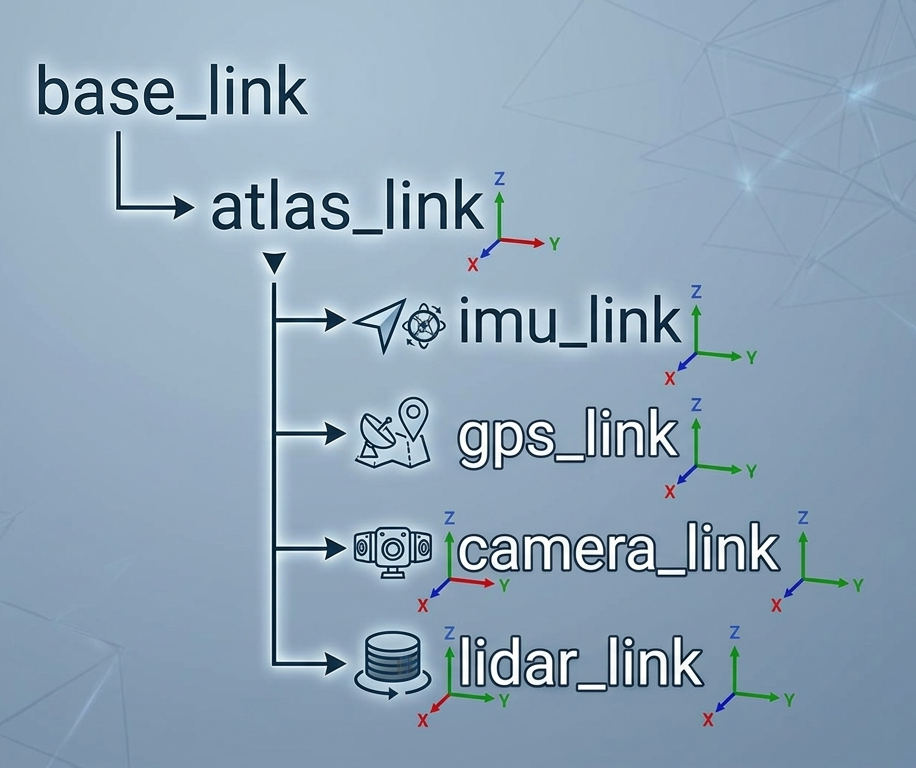
Typical setup:
atlas_linkas reference frame- sensors defined relative to Atlas
Supports:
- TF2
- URDF
- static transforms
System Integration Overview
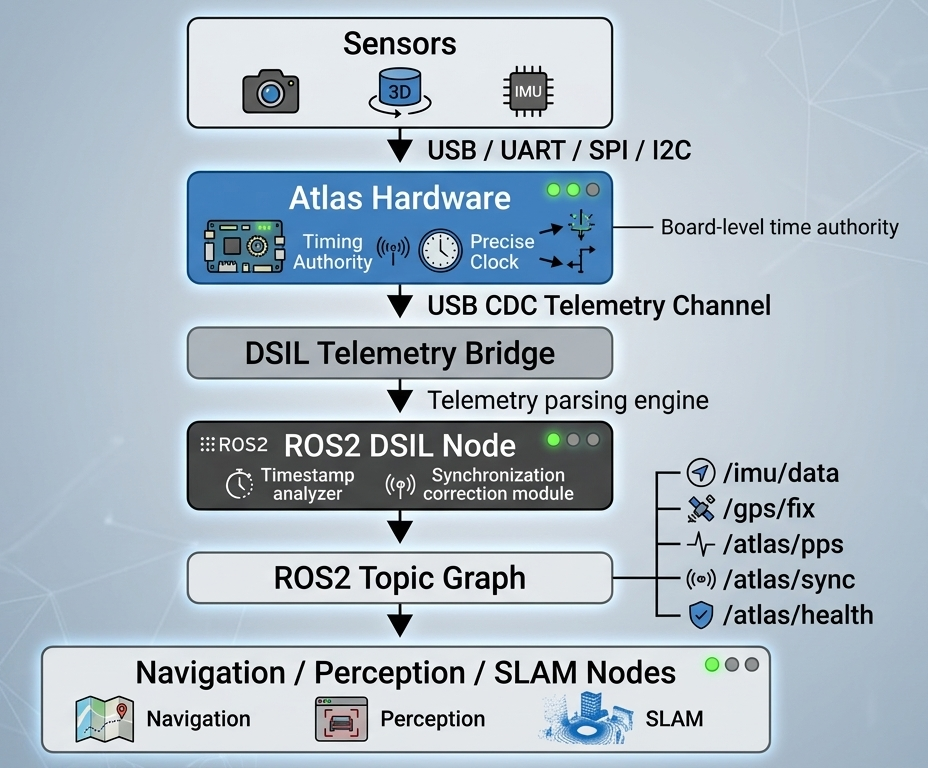
Atlas introduces a deterministic timing boundary across the system.
Multi-Sensor Alignment
Without Atlas
- drift across sensors
- inconsistent timestamps
- degraded fusion
With Atlas
- shared time authority
- PPS alignment
- deterministic timing
ROS2 Driver Compatibility
Atlas works with existing drivers:
| Sensor | Driver |
|---|---|
| USB Cameras | usb_cam |
| Ouster LiDAR | ouster_ros |
| Velodyne LiDAR | velodyne_driver |
| IMU | microstrain_inertial_driver |
No driver changes required.
Minimal Integration Requirements
- Linux system
- ROS2 installed
- USB connection
- DSIL SDK
No kernel modifications required.
Why ROS2 Engineers Adopt Atlas
Without Atlas
- repeated integration effort
- fragile synchronization
- invisible timing errors
- long debugging cycles
With Atlas
- deterministic sensor timing
- observable system behavior
- faster bring-up
- reproducible results
Atlas converts:
custom integration → deployable infrastructure
System Boundary
Atlas handles:
- sensor timing
- synchronization
- telemetry
Atlas does NOT handle:
- motor control
- real-time actuation loops
Integration Principles
Atlas is:
- non-intrusive
- deterministic
- observable
- tier-aware
This means:
- drivers stay unchanged
- time is corrected consistently
- timing quality is explicit
- engineers can trust the data
Why This Matters
Engineers are not asking for “time authority”.
They are asking:
- why fusion is unstable
- why replay is inconsistent
- why debugging takes days
- why sensor swaps break behavior
Atlas provides a direct, measurable answer.
Summary
Atlas does not replace ROS2.
It makes ROS2 sensor data:
deterministic, observable, and trustworthy
What Comes Next
At this point, you have seen how Atlas:
- defines a hardware timing boundary
- converts timing into usable data
- integrates into ROS2 systems
The next step is to evaluate Atlas in your own environment.
👉 Request the Atlas Evaluation Kit NOW!