Atlas Evaluation Kit
Where This Fits
This page is the final step in the Atlas documentation flow.
After understanding:
- the synchronization problem
- the Atlas hardware architecture
- the DSIL software layer
- the ROS2 integration model
you are now ready to evaluate Atlas in your own robotics system.
The purpose of the Atlas Evaluation Kit is not to explore a concept, but to validate deterministic sensor integration in a real environment.
This is where Atlas moves from architecture to measurable system behavior.
Atlas Evaluation Kit Setup
The Atlas Evaluation Kit allows robotics teams to validate deterministic multi-sensor synchronization using a real sensor stack.
The evaluation is designed to answer one question:
Can Atlas reduce cross-sensor timestamp drift and simplify sensor integration?
The complete evaluation can typically be performed in under 30 minutes once the system is connected.
Request an Evaluation Kit
Robotics teams interested in evaluating Atlas may request an evaluation kit.
When requesting a kit, please include:
• Company / organization
• Contact name and role
• Robotics platform description
• Current sensor stack (camera, LiDAR, IMU, etc.)
• Estimated evaluation timeline
• Shipping location
Evaluation Kit Availability
The Atlas Evaluation Kit is provided free of charge to qualified robotics development teams for the purpose of technical evaluation.
The goal of the evaluation program is to allow engineering teams to validate Atlas synchronization performance in their own development environment before committing to a potential OEM integration pilot.
Evaluation kits are distributed in limited quantities to robotics teams actively developing multi-sensor perception platforms.
Evaluation Program Terms
| Item | Description |
|---|---|
| Cost | Free evaluation kit |
| Evaluation period | Typically 2–3 weeks |
| Shipping | SensorDeck ships the kit to the evaluation team |
| Return requirement | Kit must be returned after the evaluation period |
| Return shipping | Return label provided by SensorDeck |
The evaluation kit remains the property of SensorDeck and is intended strictly for technical evaluation purposes.
What the Evaluation Kit Includes
The Atlas evaluation kit contains a reference sensor stack designed to expose real synchronization problems across multiple timing domains.
Hardware Included
| Component | Role |
|---|---|
| Atlas Reference Board | Sensor aggregation and timing backbone |
| USB UVC Camera (Logitech C270) | Standard host-timestamp camera |
| Ethernet LiDAR (Livox MID-360) | Independent clock domain sensor |
| IMU (VectorNav VN-100) | High-rate inertial sensor |
| GNSS (u-blox ZED-F9P) | Global PPS reference clock |
| GNSS antenna | PPS timing reference (included) |
| Industrial USB cables | Sensor connections |
| PPS timing cable | GNSS → Atlas timing discipline |
The sensor stack intentionally includes multiple independent timing domains so synchronization improvements can be clearly observed.
The Logitech C270 is intentionally used as a standard UVC camera without hardware sync pins, demonstrating how Atlas improves timing even for sensors that normally rely on host timestamps.
GNSS Timing Note
The included u-blox ZED-F9P GNSS receiver provides a PPS timing reference.
For best results the GNSS antenna should be placed:
• near a window
• outdoors
• or in a location with partial sky visibility
However, Atlas can also operate in internal time authority mode if GNSS lock is unavailable, allowing evaluation inside indoor labs or facilities without direct sky access.
What to Prepare Before the Kit Arrives
Most robotics teams can prepare their compute platform before the evaluation kit arrives.
Required Compute Platform
Any Linux SBC capable of running ROS2.
Examples include:
• NVIDIA Jetson Orin Nano
• NVIDIA Jetson Xavier
• Intel NUC
• x86 ROS workstation
Recommended environment:
Ubuntu 22.04
ROS2 Humble
Python 3.10+
Required Network Setup
The system should allow:
• USB device access
• Ethernet connection for LiDAR
• ROS2 topic transport
Software Dependencies
Install the following ROS2 drivers:
usb_cam
livox_ros2_driver
vectornav_driver
These drivers run independently of Atlas.
Atlas does not modify sensor firmware or drivers.
Evaluation System Architecture
The evaluation intentionally uses sensors with independent clocks.
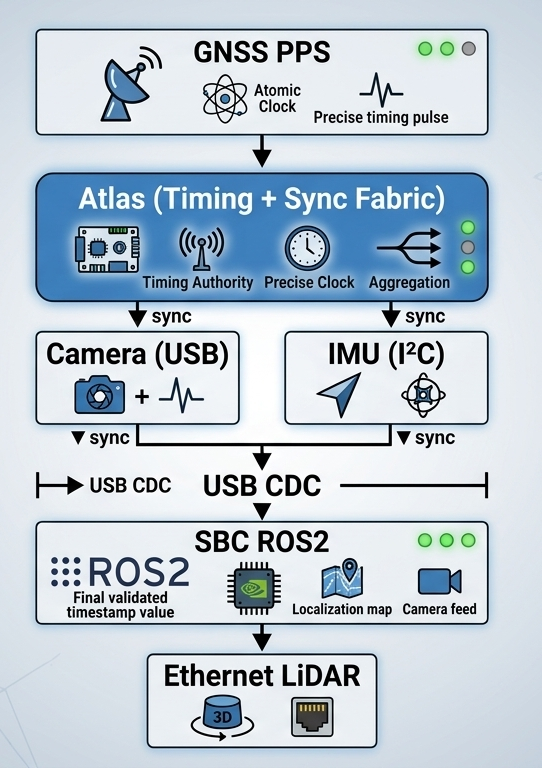
This setup allows Atlas to demonstrate cross-domain sensor alignment.
30-Minute Evaluation Flow
Step 1 — Connect Sensors
Camera → Atlas USB
IMU → Atlas I²C
GNSS → Atlas UART + PPS
Atlas → SBC via USB
LiDAR connects directly to SBC Ethernet.
Step 2 — Start Atlas
fusion_start
Expected output:
Fusion detected
PPS locked
Timing engine active
Step 3 — Start Sensor Drivers
Launch ROS2 drivers:
ros2 launch livox_ros2_driver
ros2 run usb_cam usb_cam_node
ros2 run vectornav_driver imu_node
Verify topics:
ros2 topic list
Example:
/camera/image
/livox/lidar
/imu/data
Step 4 — Baseline Timing Measurement
Measure cross-sensor timestamp drift.
dsil_analyze --baseline
Example result:
Camera ↔ LiDAR offset: 12 ms
IMU ↔ LiDAR offset: 8 ms
This confirms that the system currently has unsynchronized sensors.
Step 5 — Activate DSIL Synchronization
dsil_sync
DSIL applies a dynamic timestamp offset mapping each sensor's arrival time to the Atlas hardware timing boundary.
Step 6 — Verify Synchronization
dsil_sync_check
Expected result:
Camera ↔ LiDAR offset: 0.9 ms
IMU ↔ LiDAR offset: 0.5 ms
Step 7 — Generate Visualization
dsil_plot
Outputs:
offset_before.png
offset_after.png
These graphs visualize timestamp alignment improvements.
Golden Pass Criteria
An evaluation is considered successful when the following metrics are achieved.
| Metric | Target |
|---|---|
| Cross-sensor offset | < 1 ms |
| Synchronization stability | > 30 minutes |
| Time base | GNSS disciplined |
| Sensor drivers | unchanged |
This demonstrates that Atlas establishes a deterministic timing boundary across multiple sensor types.
Evaluation Performance Report
At the end of the evaluation the engineering team can generate a one-page performance report.
The report typically contains:
• baseline drift measurement
• synchronized drift measurement
• synchronization improvement graphs
• system architecture diagram
Example result:
| Metric | Before Atlas | After Atlas |
|---|---|---|
| Camera ↔ LiDAR | 12 ms | 0.9 ms |
| IMU ↔ LiDAR | 8 ms | 0.5 ms |
This report allows the engineering lead to present a clear recommendation internally.
CTO Recommendation Summary
Typical internal recommendation structure:
Problem
Multi-sensor perception stacks suffer from timestamp drift and complex integration.
Atlas Result
Deterministic timing boundary established across camera, LiDAR, and IMU.
Impact
• Improved sensor alignment for SLAM
• Reduced perception pipeline uncertainty
• Simplified integration architecture
Recommendation:
Proceed to OEM integration pilot evaluation.
What Happens After Evaluation
If the evaluation demonstrates value, teams typically move to a White-Label OEM Integration Pilot.
The pilot phase adapts Atlas to the production robot platform.
OEM Pilot Program Includes
• Custom connector configuration
• Sensor interface mapping
• Power distribution design
• Mechanical mounting integration
• Software integration support
The pilot program produces a white-label Atlas reference design customized for the robot platform.
OEM Deployment Validation
During the OEM pilot phase a second validation is performed inside the real robot system.
Metrics validated:
• full robot sensor synchronization
• perception pipeline stability
• system latency impact
• deployment reliability
• power and thermal behavior
Once validated, Atlas becomes part of the robot’s production sensor infrastructure.
Evaluation Completion Feedback
After completing the evaluation we ask participating teams to provide a brief outcome summary.
This feedback helps improve the Atlas platform and determine whether further collaboration would be useful.
Providing feedback does not create any obligation.
Option A — Ready to Discuss OEM Integration Pilot
The evaluation demonstrated value for our system.
We are open to discussing a White-Label OEM Integration Pilot.
Optional notes:
Key benefits observed:

• ___________________________
• ___________________________
• ___________________________
Option B — Evaluation Completed, Returning the Kit
The evaluation is complete and we will return the kit.
At this time we do not plan to move forward with integration.
Optional feedback (1–3 reasons):
Reason 1:
________________________________

Reason 2:
________________________________

Reason 3:
________________________________
Typical reasons may include:
• Not aligned with current architecture
• Timing infrastructure already implemented internally
• Sensor stack roadmap changed
• Budget or project timing constraints
Option C — Possible Future Interest
The evaluation was useful, but we are not ready to proceed at this time.
Optional follow-up information:
Preferred contact:
________________________

Possible follow-up timeframe:

□ 3 months
□ 6 months
□ 12 months
□ Other: __________
Returning the Evaluation Kit
After the evaluation period, please return the kit using the provided shipping label.
Return address:
SensorDeck Evaluation Program
ATTN: Atlas Evaluation Returns
[Return Address Placeholder]
[City, State ZIP]
USA
Please include all components originally provided in the kit.
Final Note
We appreciate the time engineering teams spend evaluating new infrastructure.
Even when Atlas is not the right fit today, the feedback from evaluation programs helps improve future platform development.
What Comes Next
By completing this evaluation, you have validated that Atlas:
- establishes a deterministic timing boundary
- simplifies sensor integration
- integrates without modifying your existing stack
At this stage, Atlas is no longer a prototype component.
It is ready to be integrated into your production system.
OEM Integration Path
Atlas is designed to transition directly from evaluation into OEM deployment.
You can integrate Atlas into your product in three ways:
- use Atlas as a reference integration platform
- embed Atlas into your system architecture
- adopt Atlas through a white-label (OEM) integration program
Atlas eliminates the need to redesign:
- sensor wiring architecture
- timing synchronization systems
- onboard power distribution
Why Teams Move to Production
After evaluation, robotics teams typically proceed because:
- the integration model requires no driver changes
- deterministic timing improves system reliability
- system architecture becomes simpler and more scalable
Atlas replaces recurring engineering effort with a reusable infrastructure layer.
Next Step
If Atlas meets your system requirements, the next step is to begin an OEM integration pilot.
👉 Contact us to start an Atlas OEM / White-Label Integration Program
Still have integration questions?
👉 See the Integration FAQ